随分前の話だが、メモっていた内容を記事として供養。
自宅用Nextcloudがアップデートされたので、Webコンソールから様子を見るか〜と思っていたら、以下のメッセージが出ていた。
Cannot write into “config” directory!
This can usually be fixed by giving the web server write access to the config directory.
But, if you prefer to keep config.php file read only, set the option “config_is_read_only” to true in it.
はて?
ちなみに、環境はArchLinuxで、パッケージほぼそのまま運用しているので、諸々の所在としては以下のようになっているはずである。
DocumentRoot: /usr/share/webapps/nextcloud
Config directory: /usr/share/webapps/nextcloud/config -> /etc/webapps/nextcloud/config
また、それぞれのバージョンは以下の通り。
- nextcloud: 31.0.7-1
- apache: 2.4.63-3
- php-legacy 8.2.29-1
- php-legacy-fpm: 8.2.29-1
シンプルにパーミッションを確認する
実行ユーザはhttpで、諸々の所有者はnextcloudユーザのため、nextcloudグループにhttpを追加してあり、書き込めるものについては664のようにしてあるので、問題ないように感じる。
config_is_read_onlyはtrue設定済み。読めてないのか?
https://github.com/nextcloud/server/blob/v31.0.7/lib/base.php#L211
当該メッセージを出力しているのはこのあたり。
以下該当メソッド抜粋。
1
2
3
4
5
6
7
8
9
10
11
12
13
14
15
16
17
18
19
20
21
22
23
24
25
26
27
28
29
30
31
32
33
public static function checkConfig(): void {
	$l = Server::get(\OCP\L10N\IFactory::class)->get('lib');

	// Create config if it does not already exist
	$configFilePath = self::$configDir . '/config.php';
	if (!file_exists($configFilePath)) {
		@touch($configFilePath);
	}

	// Check if config is writable
	$configFileWritable = is_writable($configFilePath);
	if (!$configFileWritable && !OC_Helper::isReadOnlyConfigEnabled()
		|| !$configFileWritable && \OCP\Util::needUpgrade()) {
		$urlGenerator = Server::get(IURLGenerator::class);

		if (self::$CLI) {
			echo $l->t('Cannot write into "config" directory!') . "\n";
			echo $l->t('This can usually be fixed by giving the web server write access to the config directory.') . "\n";
			echo "\n";
			echo $l->t('But, if you prefer to keep config.php file read only, set the option "config_is_read_only" to true in it.') . "\n";
			echo $l->t('See %s', [ $urlGenerator->linkToDocs('admin-config') ]) . "\n";
			exit;
		} else {
			OC_Template::printErrorPage(
				$l->t('Cannot write into "config" directory!'),
				$l->t('This can usually be fixed by giving the web server write access to the config directory.') . ' '
				. $l->t('But, if you prefer to keep config.php file read only, set the option "config_is_read_only" to true in it.') . ' '
				. $l->t('See %s', [ $urlGenerator->linkToDocs('admin-config') ]),
				503
			);
		}
	}
}
バカみたいに画面に情報を出力しまくって、様子を見てみた。つまり、
1
echo $l->t((OC_Helper::isReadOnlyConfigEnabled()?'o':'x') . 'Cannot write into "config" directory!') . "\n";
とかで状況を見てみる。
結局、 isReadOnlyConfigEnabled は true だったが、 \OCP\Util::needUpgrade() が true を返しているため、 configFileWritable が true である必要があるようだ。
というわけで、 is_writable($configFilePath) が false なのは何故?というのが問題になる。
isWritable($configFilePath)がfalseな理由
全然見当がつかなかったので、ChatGPTにぼんやり聞いてみたところ、
- open_basedirで制限されている説
- disable_functionsでfopen, fwrite等が制限されている説
- SELinuxで制限されている説
- configディレクトリに到達するまでの途中のディレクトリで、x権限が漏れている説
- ACLで制限されている説
- ファイルシステムがread-onlyな説
- ApacheのAliasやmod_rewriteとかが邪魔して、アクセスしようとしているconfigディレクトリのパスが誤っている説
- .htaccessが壊れてる説
- php-fpmでchrootしてる説
と、実にたくさんの可能性を示してくれたが、全て空振り。
で、最終的に、straceしたら?みたいに言われてしまったので、straceしてみた。
1
2
3
4
5
6
7
$ sudo strace -f -e trace=stat,access -p $(pgrep -n php-fpm) -o strace_output
$ cat strace_output | grep config.php
access("/usr/share/webapps/nextcloud/config/config.php", F_OK) = 0
access("/usr/share/webapps/nextcloud/config//config.php", F_OK) = 0
access("/usr/share/webapps/nextcloud/config//config.php", W_OK) = -1 EROFS (Read-only file system)
access("/usr/share/webapps/nextcloud/config//config.php", R_OK) = 0
access("/usr/share/webapps/nextcloud/config//config.php", W_OK) = -1 EROFS (Read-only file system)
F_OKは存在確認、R_OKは読み込めるか確認、W_OKは書き込めるかの確認らしい。
W_OKのときはエラーで、EROFSが出ていた。
access()がEROFSな理由
これもまたChatGPTに聞いてみたが、
- roでmountしてる説
- immutable属性がついている説
- bind mount元が読み取り専用な説
- 別のプロセスでオープンされている説
- AppArmorやseccompで制限されている説
やっぱり全て空振り。
初心に戻って、 php EROFS とかでぐぐってみたら、以下サイトが割と上位に出てきた。
https://wylie.me.uk/nikola/output/posts/cgi-binblosxomcgi20201230/
archive
この人もNextcloudが起動できなくて困っていたようだ。apacheのserviceファイルで、 ProtectSystem=full が設定されていたために、このunitから起動されたプロセスにおいては、read-onlyになってしまっていた、ということ。
手元環境で設定値を確認してみると、
1
2
3
4
$ systemctl show httpd --property ProtectSystem
ProtectSystem=no
$ systemctl show php-legacy-fpm --property ProtectSystem
ProtectSystem=full
これじゃねーか!!
対処
というわけで、適当にmanとか見つつ、以下のような感じで対処。
1
2
3
4
5
6
$ sudo systemctl edit php-legacy-fpm
// 以下を記載して保存
[Service]
ReadWritePaths=/etc/webapps/nextcloud/config/
$ sudo systemctl daemon-reload
$ sudo systemctl restart php-legacy-fpm
ProtectSystemをnoにしても良いのだけど、折角の保護機能なんだし、有効にはしておこう。ほんで、ReadWritePathsでホワイトリストとして管理する。
操作が完了したら、ReadWritePathsは外しておくかな。
そして、apacheにはProtectSystem=fullを指定しておくのが良いんじゃないか?どうせ全部ReadOnlyでも痛くないだろ、諸々はNextcloudがやってくれてるんだし、あくまで仲介の立場でしかないのだ。
最後に
ChatGPTと何度もやり取りしながらトラブルシュートしてると、いちいち「詳細な確認ありがとうございます」「最も疑わしいのは〜〜です」と、どうでもいい美辞麗句と不用意な言い切りにまみれていて不愉快だった。多分こういうのを黙らせるようなプロンプトを事前に設定しとくんだろうが。
ちなみに、ArchWikiのNextcloudのページを見てみると、
https://wiki.archlinux.jp/index.php/Nextcloud
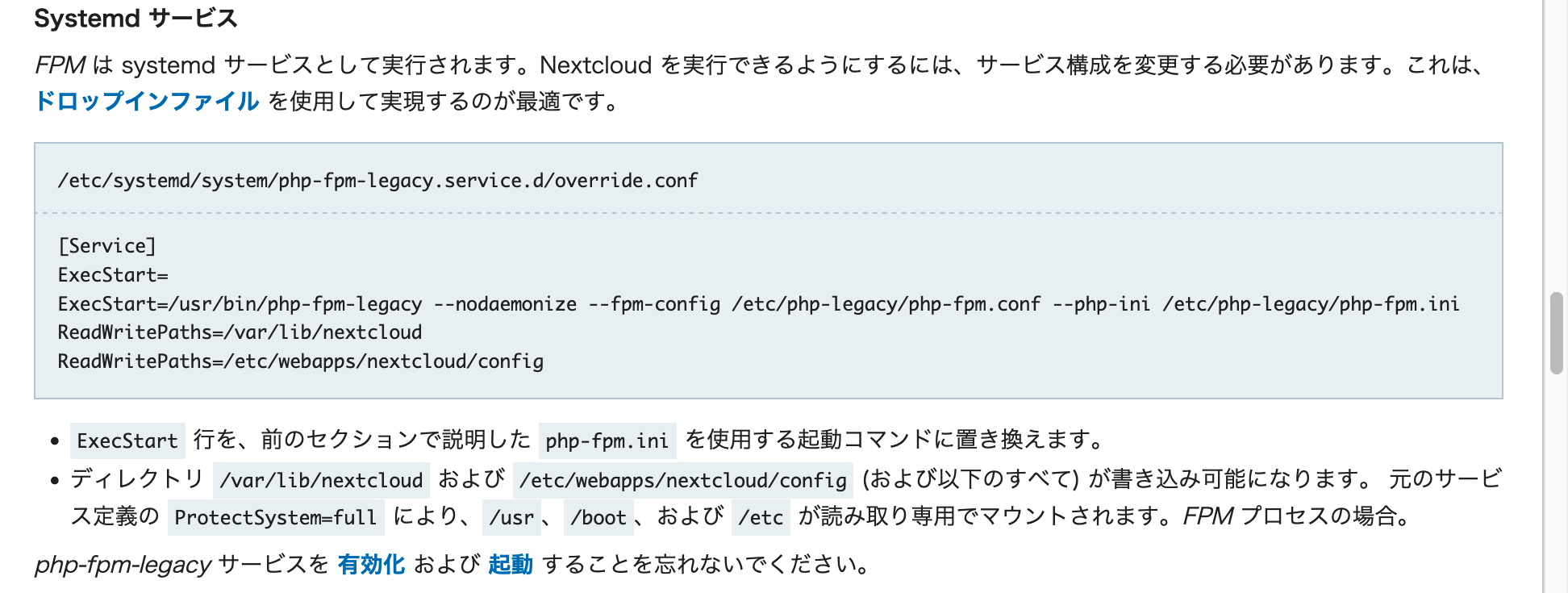
書いてあるじゃん。やっぱりArchWikiをちゃんと読めってことなんだよな………(10時間くらい彷徨い苦しんだ顔)